


With the NBA playoffs upon us, it’s time to release the NBA version of Coach’s Gamecast.
If you are unfamiliar with the NCAA version that released in March, I will give a quick overview of the features that are the same, and then highlight additional features unique to the pro game.
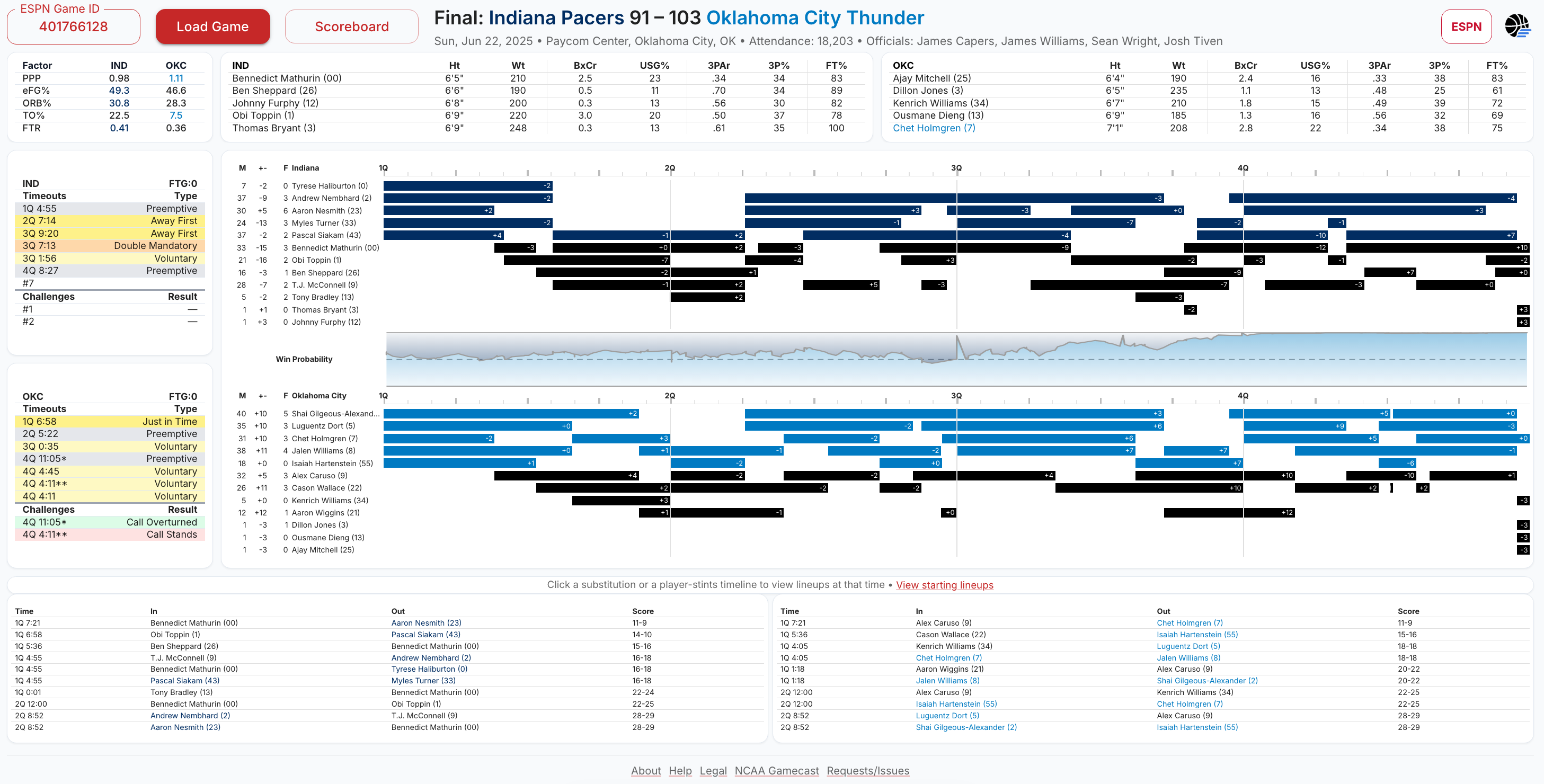
Same as NCAA - More Detail Here
Four Factors - Points per possession (PPP), shooting efficiency (eFG%), rebounding (ORB%), turnovers (TO%), and free throw rate (FTR).
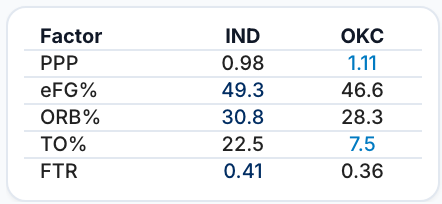
Lineups - Comparison of players on the floor sorted by player size instead of jersey number. Identify cross-matches and offensive roles for each team.

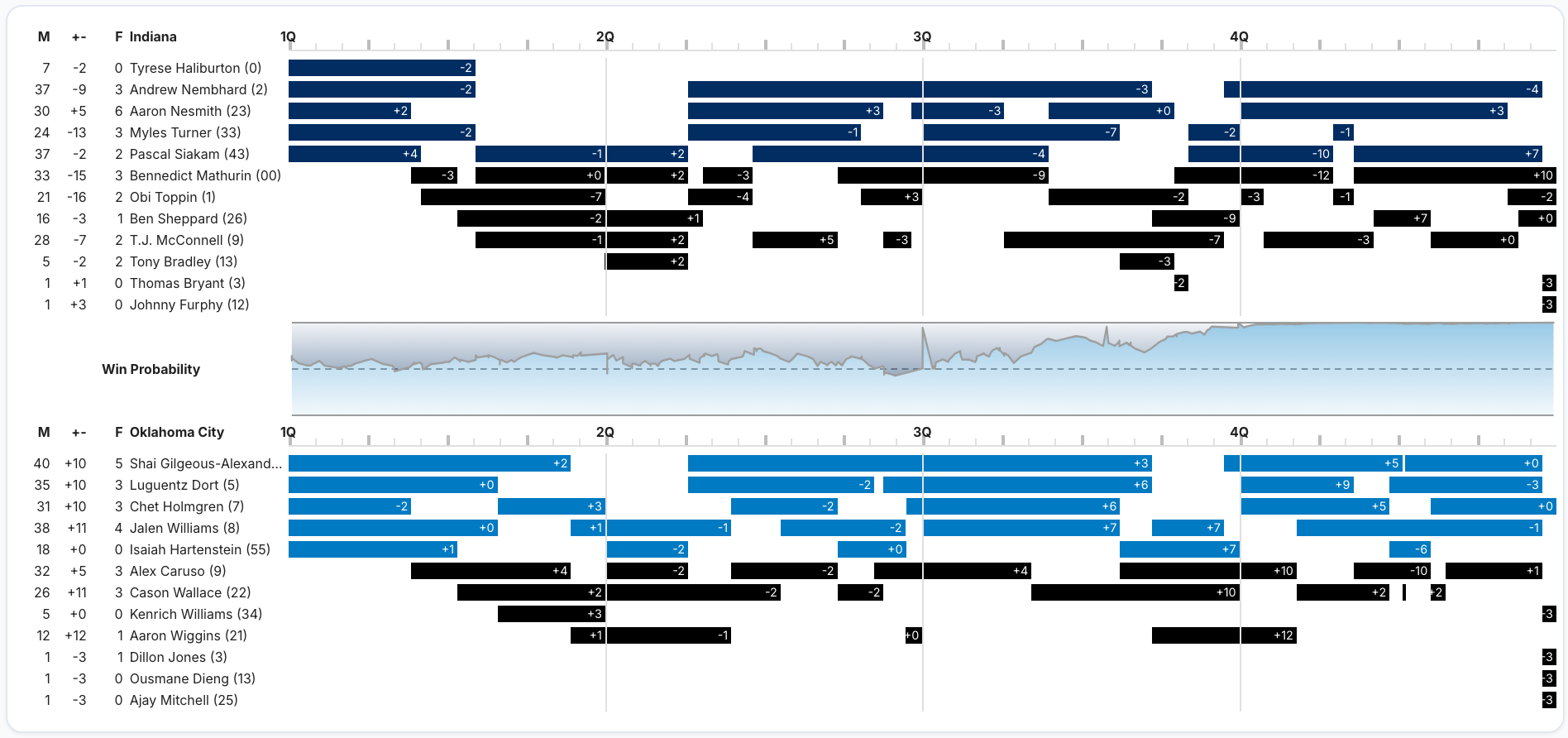
Rotations - Visual representation of player stints. Observe substitution patterns, track game flow with the win probability chart, and check minutes played, plus/minus (+/-), and personal fouls.
Substitutions and Rewind Mode - Logs of every substitution. Click a substitution to display lineups from earlier points in the game. Review key stretches and analyze the matchups.

**NEW FEATURE** Click the rotation charts to enter rewind mode.
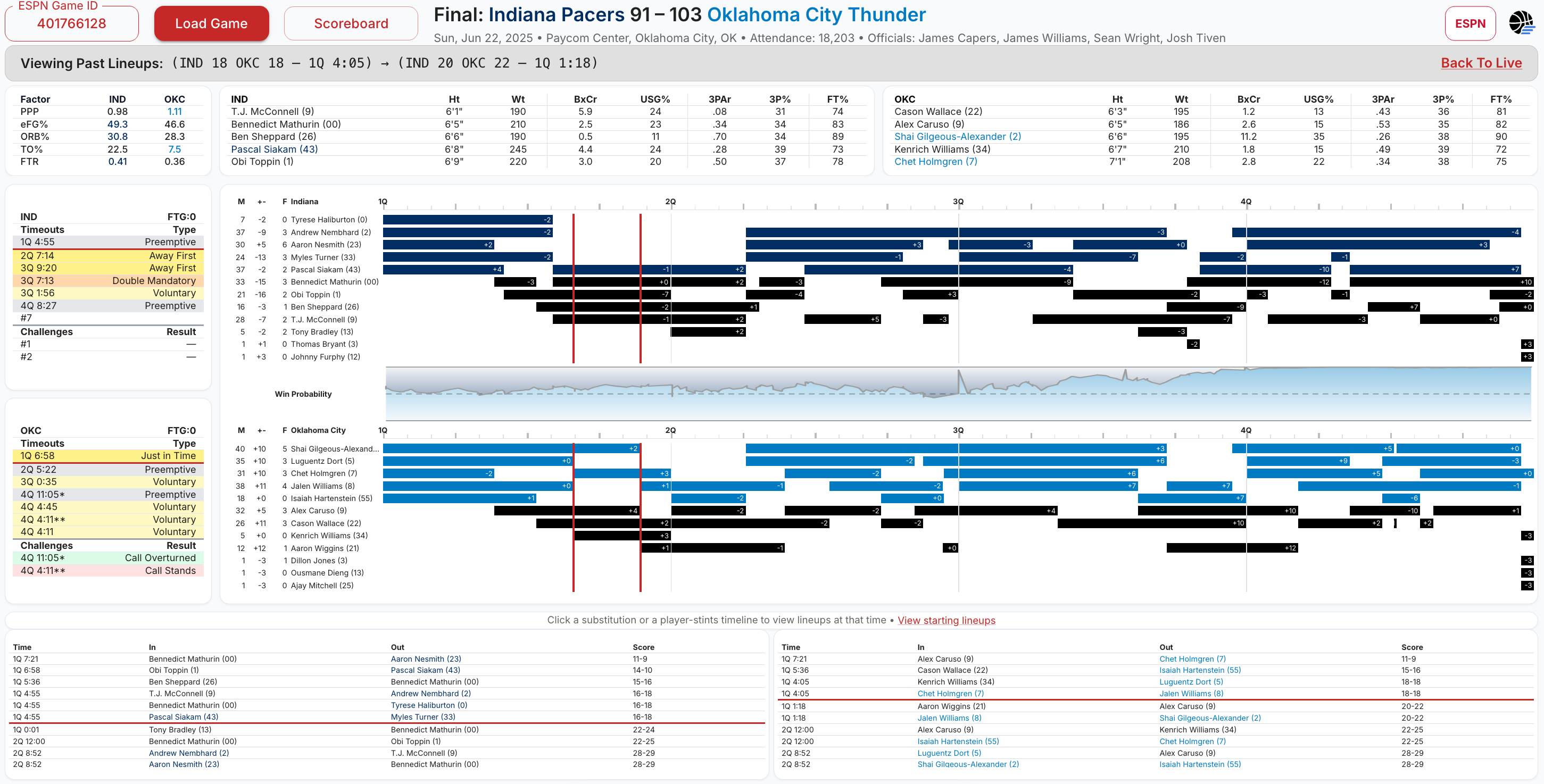
New for NBA Coach’s Gamecast
This is where this version becomes more powerful. Rules for Timeouts, Challenges, and Team Fouls1 are much more complex in the NBA than NCAA, which is a good thing for a smart coach. As the rules become more complicated, there is a greater ability to gain an edge by using them to your advantage.
If you haven’t seen my previous article explaining NBA timeouts and challenges, along with strategic considerations involved, I strongly suggest you give it a read now. It is essentially a prerequisite for understanding what Coach’s Gamecast displays.
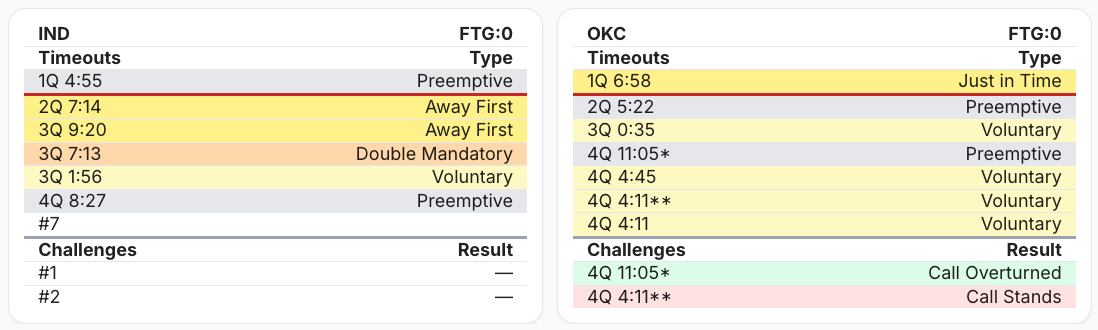
Teams get one challenge per game and earn a second if the first is successful. Unlike college, winning a challenge does not necessarily mean the team gets to keep their timeout. If a team is using a second challenge, or if the challenge triggers a mandatory timeout, the team will still be charged a timeout for their successful challenge.2
In this gamecast, challenges are shown as “call overturned” or “call stands”, with indicators of which timeouts were charged. Timeouts are less easily judged as simply successful or not. However, the complex timeout rules of the NBA lead to some useful categorization.
Timeout Types
Preemptive - A timeout taken by a team before the time they would be charged with one. For example, if the home team takes the first timeout of the quarter at 8:15.
Away First - The first timeout of a quarter if it is taken by the away team, thus delaying the home team’s mandatory timeout from 7:00 to 3:00.
Forced - A mandatory timeout assigned to a team due to a dead-ball after either the 7:00 or 3:00 mark. The gamecast includes whether the team assigned the timeout will be on offense or defense coming out of the huddle.
Just in Time - A live-ball timeout taken by a team that would have been assigned a mandatory timeout at the next dead-ball (e.g., the home team takes the first timeout of the quarter at 6:45).
Double Mandatory - The second timeout of a quarter taken by the same team that took or was charged with the first timeout of the quarter.
Forfeited - Timeouts lost at the end of the third quarter, with three minutes left in the game3, or at the start of an overtime period.
Voluntary - All other timeouts. The first and second timeouts of a quarter are never voluntary. All overtime timeouts, two per OT with no carryover, are voluntary.
These timeout types can be hypothesized to be better or worse than one another. I hold two assumptions:
Timeouts are good for the team that uses them. They are a tool in the coach’s kit.
Timeouts are most often better for the team that is next on offense, partially because coaches can draw up after-timeout (ATO) plays.4 The cases where this is not true are most often in late game situations, which are not part of the mandatory timeout equation.
The first assumption I think is fairly reasonable and suggests that forfeiting timeouts is undesirable. Most often I see timeouts forfeited by teams in blowout wins. However, I have seen cases where teams forfeit multiple timeouts in losses and that raises a red flag for me.
The latter assumption warrants further analysis that I may be able to do in the future now that I have a multi-year NBA timeout database. But if it holds, the “Forced - Defense” type of timeout is also undesirable. If a team waits until it is charged a mandatory timeout at a dead-ball, and the other team will inbound after the timeout, the application will highlight that timeout in red.
Both “Forced - Offense” and “Just in Time” imply that the team next to be charged a mandatory timeout has allowed the game clock to fall below the time threshold. In the case of “Forced - Offense”, there was a dead-ball, but the team was fortunate to be in possession when it occurred. This is displayed with an orange fill.
“Just in Time” would cover the case where, for example, a team dribbles into the frontcourt and takes a timeout prior to the dead-ball that would force them into one. This still indicates that the team has taken some risk and therefore is shown in yellow.5
The other yellow-coded type is the “Away First” timeout. NBA timeout rules are advantageous to the road team as they are charged the latter mandatory timeout each period. While there may be a perfectly good reason for an away team to use the first timeout of a quarter, it does provide the home team a reprieve. Depending on how close to 7:00 it was taken, a coach may have been better off waiting. These require closer inspection.
An “Away First” timeout also opens the door for a potential away-team “Double Mandatory” timeout. Either side could take the first two timeouts of a quarter, thus allowing the other team an exemption from a mandatory timeout in that period. This effectively gives the opponent an additional “Voluntary” timeout to be used prior to the next potential forfeiture checkpoint.
“Double Mandatory” timeouts are highlighted in orange, while “Voluntary” timeouts are in a light yellow, indicating they might be worth reviewing to better understand why they were used.
Finally, “Preemptive” timeouts are shown in gray as they represent standard practice. However, there still could be better or worse uses. If a home team takes their first timeout early in a quarter (e.g., 10:30) and the away team follows with a timeout at 9:30, both would be “Preemptive”. But the away team preempted a timeout that would not have been mandatory until the dead-ball under 3:00. If they could have held off longer, perhaps the home team would have taken a “Double Mandatory”.
How to Use
Select a game from the scoreboard or team schedule pages.
Click any substitution to view previous lineups. Or click within the rotations chart.
Read tooltips (hover) to learn more.
Notes
Data reliability depends on ESPN APIs.
The app is intended for games from the 2017-2018 season and beyond because timeout rules were significantly different before then.
Challenges were introduced in 2019-2020 and starting in 2023-2024, teams could earn a second challenge if they won their first. The app will adapt depending on the game year.
Coach’s Gamecast currently refreshes data every 30 seconds for live games.
I prefer the desktop version so I can see all the elements simultaneously, but I have worked to optimize the mobile UI as well so I can still use the app while I am at games in person.
Feedback
What have I missed that would make this tool even better?
Please provide feature requests or report issues whenever possible. And please do share with anyone else that you think might be interested.
Thanks, hope you enjoy!
Fouls to give (FTG) are listed in the header row of the timeouts/challenges section.
This is why you see an increased usage of timeouts later in each quarter, after mandatory timeouts have occurred.
Technically, the latter of the three-minute mark and the second mandatory timeout of the fourth quarter.
Coaches will sometimes draw up their next offensive play even if they leave the huddle on defense, but it might not be as clean depending on how the defensive possession ends.
I am still improving the categorization logic because edge cases exist.
For example, the play-by-play data that I have does not include deflections out of bounds. So if a team is going to be charged a mandatory timeout at the next dead-ball and while on offense, has the ball deflected out of bounds, that would appear to the app like a live-ball timeout and therefore be categorized as “Just in Time”. However, in reality, this is a dead-ball timeout and should be categorized as “Forced - Offense”.
I am searching for other cases with issues and would love feedback if you find any.